

The New Mexico Business Entity Search is a free public service reached through the state’s online business portal. It queries filings delivered to the Secretary of State and returns rows for limited liability companies, business corporations, nonprofit corporations, limited partnerships, and limited liability partnerships holding authority in the state. Results arrive as a table rather than as a report, and that table is the starting point for every record view the portal offers.
Entities organized in New Mexico and entities formed elsewhere but registered there share one index, one result table, and one detail view. What follows describes the search form, the fields that produce matches, the arrangement of a result grid, the contents of a detail page, and the points at which the public record stops. The order follows the path a searcher takes from a typed name to a filed document.
Using the New Mexico Business Entity Search Screen
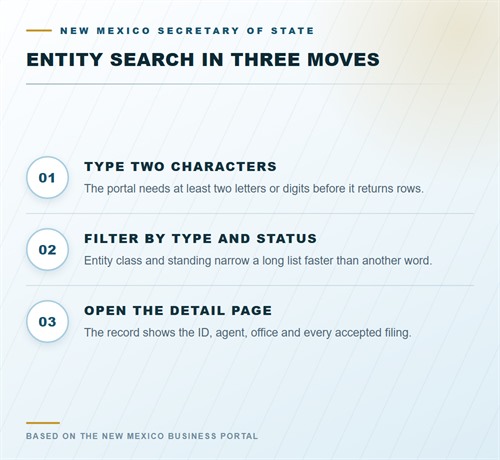
The New Mexico Business Entity Search opens on a single text field with no filter panel attached to it, so a query runs against the whole registration index at once. That design keeps the form short but makes the phrasing of a query matter, since a brief word can return dozens of rows while a distinctive phrase narrows the set immediately. Precision comes from typing rather than from configuring options before the first submission.
New Mexico Secretary of State, public business entity search within the New Mexico Business Portal:
https://enterprise.sos.nm.gov/search
Search Rules for Names and Identifier Numbers
The form rejects a query shorter than two alphanumeric characters, so a lone letter or digit produces a validation notice instead of rows. A registered name carrying a special character must be typed with that character in place, because the index stores names as filed and will not substitute a plain word for an ampersand, slash, or apostrophe. Spaces count toward the minimum only as separators, never as characters.
Matching Punctuation Inside a Registered Name
Punctuation is part of the stored string, not decoration around it. Searching the words on either side of a slash while omitting the slash can return an empty table even where the company plainly exists. When an exact name is known, reproducing it character for character removes that failure mode, including capitalization that looks unusual. Truncating a name at the punctuation and searching the leading words often recovers the row instead.
Searching by Entity ID Instead of Name
An entity ID is a fixed identifier assigned at registration and printed on acknowledgments and certificates. Because the number is unique, a query on it returns one file or none, which suits anyone working from a document prepared by another party. Partial digits rarely help, since the index compares the whole sequence. Copying the number rather than retyping it guards against a transposed pair of digits.
Reading the Result Grid
Every returned line carries the registered name, the entity ID, the organization type, the jurisdiction of formation, and a status marker. Names print exactly as filed, capitalization and punctuation intact, which separates two affiliates whose titles differ by a single word or suffix. Rows are selectable, and one opens the full detail view with the addresses and filings attached to that registration.
What Each Column Reports
Organization type tells a limited liability company from a corporation or a partnership. Jurisdiction tells whether the company was organized under New Mexico law or came in from another state or country. The status column reflects the office’s own filing record at the moment of the query, and it changes as documents are processed. Formation dates sit on the detail page rather than in the grid itself.
Picking the Right Row from a Shared Name
Where several companies carry nearly identical titles, the entity ID is the reliable separator, followed by jurisdiction and status. Formation dates visible after opening a record add a further check. Opening two or three candidates in sequence is faster than guessing which suffix belongs to the intended company, and the history on each page usually settles the question without a second query.
Opening an Entity Record
The detail page divides the file into blocks: identity, principal office, registered agent, and document history. The identity block repeats the name, entity ID, type, jurisdiction, and formation date, and it carries the status line. Reading that block first confirms the opened file matches the company intended rather than a namesake with a similar title, which matters before any copy is ordered.
Principal Office and Mailing Address
The principal office reflects the address reported on the most recent filing that touched it. It may sit outside New Mexico, since a state registration does not require the principal office to be local. A mailing address appears separately when the filer reported one distinct from the street address. An address that has never been amended stays as first filed, however stale it has become.
Registered Agent Block
The agent section names the party appointed to receive service of process and prints the New Mexico street address on file, since a post office box cannot satisfy the statute. The appointment is recorded on the formation document through a signed statement of acceptance, and the registered agent details view repeats those particulars in a layout of its own, with the address listed as the office recorded it.
Filters, Sorting, and Narrowing Results
Long tables can be sorted and paged. Sorting on the name clusters companies sharing a leading word, and sorting on status lifts active registrations above closed ones. A distinctive word taken from the name, paired with a type filter, usually trims a table to a size that reads without paging through several screens. Sorts apply to the returned set only, not to the index as a whole.
Domestic and Foreign Rows in One Table
A domestic company was organized under New Mexico law and holds a formation document from the state. A foreign company was organized elsewhere and later registered to transact business locally. Both carry the same style of entity ID and both appear in a single result set, distinguished only by the jurisdiction field. A foreign row also shows a registration date later than the organization date elsewhere.
Filtering by Organization Type
Type filters remove whole classes from view, which matters when a query word appears in the titles of corporations and limited liability companies alike. Nonprofit corporations carry their own designation, and partnerships sit apart from both. Combining a type filter with a status filter leaves a short list of live companies of one kind, usually without a second search term.
What Entity Status Values Mean
The status line describes the standing of the registration in the office’s records on the date of the query. It derives from documents filed and from administrative actions taken by the office, and it updates as those events are processed. It does not describe the commercial health or solvency of the business behind the file, and it carries no weight as a credit reference.
Active Registrations
An active status means the registration stands in current effect and the office holds no unresolved action against it. For an entity formed locally, active status dates from acceptance of the formation document. For a foreign entity, it dates from acceptance of the registration to transact business in the state, a point that precedes any local filing the company later makes.
Dissolved and Revoked Files
A limited liability company reaches a closed status through a filed dissolution. A corporation may be revoked administratively for a failure under the corporate statutes, and a later reinstatement filing can restore it. A revoked file may therefore show activity after the revocation date rather than ending there, which is why the history deserves a reading rather than from the status line by itself.
What Status Does Not Measure
An active registration can belong to a business that stopped trading years ago, and a closed one can belong to a company still holding property or defending claims. Status speaks to filing compliance alone. Judgments, tax standing, and licensing sit with other bodies and appear nowhere in the portal, so a clean status line is not a clearance of any kind.
Document History and Filed Records
The history lists each document the office has processed for the entity, in date order, with the type named. Formation papers, amendments, agent changes, mergers, and dissolutions appear as separate entries. The sequence shows when control, address, or structure moved, and gaps between entries can be as informative as the entries themselves when a change is being reconstructed.
Reading the Dates in the History
Each entry carries the date the office accepted the filing rather than the date the parties signed it. A delay between signature and acceptance is normal where a document arrived incomplete. Comparing dates across entries shows how long a change took to reach the record after it was decided, which helps where a contract refers to a filing made effective on a particular day.
Linked Images and Their Absence
Many entries carry a link to a stored image of the filed document. Older paper filings may be represented by an entry with no scan attached, particularly where records predate the online system. Where no image appears, a copy can be ordered from the Business Services Division rather than assumed lost or withheld from public view by policy.
What the Public Record Leaves Out
The index publishes the registration, not the business. Ownership is absent, and so is any statement of who controls the company day to day. The record shows an agent, an address, a status, and a document trail. Anything beyond those elements must come from the company itself or from a different authority with its own disclosure rules and its own request process.
Ownership and Management Names
Member names for a limited liability company are not collected in the public file, and officer listings for a corporation reach only as far as a particular filing states them. Capital contributions, percentage interests, and profit splits never appear. Those terms live in internal documents that the office does not receive or keep, so no request to the division will produce them.
Records Held by Other Agencies
Federal employer identification numbers, state tax accounts, professional licenses, and permits all sit outside this index. Liens and judgments are recorded with county clerks, and litigation belongs to the courts. A search here answers a registration question and nothing wider, which keeps expectations aligned with the source rather than with what a general background search might imply.
The Records Office in Santa Fe
The Business Services Division of the New Mexico Secretary of State occupies 325 Don Gaspar, Suite 300, Santa Fe, NM 87501, in the Capitol Annex North. Filings now arrive through the portal, and the office stopped taking paper articles, so counter work centers on copies and certificates rather than new formations.
Where the Originals Sit
Accepted documents are retained by the division at that Santa Fe address. A search result is an index entry pointing to a file, not the file itself. Anyone needing the underlying paper or an image of it deals with the division rather than with the portal that produced the search row, and the request should name both the company and its entity ID.
Requests That Reach the Counter
Copy orders, certificate requests, and status confirmations are handled by the division. A request should identify the entity by name and entity ID so the file can be pulled without ambiguity. Turnaround depends on volume, and an order placed in person follows the same review as one submitted remotely, with the same charge attached to each document.
Certificates, Copies, and Verification
A certificate of good standing states that a registration stands in effect as of the issue date. Banks, lenders, and out-of-state agencies usually ask for one before accepting a company’s authority. The certificate covers filing standing only, and it makes no statement about taxes owed or about the conduct of the business it names.
Certified and Plain Copies
A certified copy carries the office seal and is the form accepted where an original document must be proved. A plain copy serves internal reference and carries no seal. Both are drawn from the same stored image, so the difference lies in authentication rather than in content, and a recipient who requires a seal will not accept the cheaper option.
Corporate and Nonprofit Variations
Corporate certificates follow the corporate schedule, and nonprofit certificates follow a separate one, so the charge varies with entity type. Where a company changes form, the certificate reflects the current type rather than the type at formation. Filings for corporations are listed under corporation records with their own amounts and their own share-based calculations.
Fees for Records and Filings
Amounts are fixed by statute rather than set by the office. Limited liability companies pay under NMSA 53-19-63, business corporations under NMSA 53-2-1, and nonprofit corporations under NMSA 53-8-85. A corporate amount sometimes depends on authorized shares, which is why that line reads as a range rather than a single figure that applies to every filing.
How the Schedule Is Applied
A filing fee attaches to the document, not to the company, so a business that files twice pays twice. Copy and certificate charges are separate from filing charges and are collected per document requested. A name reservation holds a name for 120 days and does not extend automatically, which means a lapsed reservation releases the name to any later applicant.
| Item | Amount |
|---|---|
| LLC articles of organization | $50 |
| LLC amended or restated articles | $50 |
| LLC foreign registration | $100 |
| LLC foreign amendment | $50 |
| LLC statement of change of registered office or agent | $20 |
| LLC agent’s statement of change of address | $20 |
| LLC name reservation or transfer | $20 |
| LLC dissolution or revocation | $25 |
| LLC certificate of good standing | $25 |
| Corporation charter filing, share priced | Per 1,000 shares: $1; floor $100; cap $1,000 |
| Corporation report | $25 |
| Corporation change of registered office or agent | $25 |
| Corporation name reservation or transfer | $25 |
| Certificate of good standing and compliance, corporation | $50 |
| Nonprofit articles of incorporation | $25 |
| Nonprofit certificate of good standing | $10 |
| Certified copy | $25 |
| Plain copy | $10 |
Frequently Asked Questions
Points raised repeatedly about the search form and the files it returns are collected below in short form.
How many characters does a name query need?
The form requires at least two alphanumeric characters before it submits. Anything shorter stops at validation. A special character inside a registered name must be typed as stored, or the match may fail.
Can a company be located without a name?
An entity ID identifies one registration uniquely. Entering the full identifier returns that file directly, which helps where a name is uncertain, where several companies share similar wording, or where a title has changed since a document was issued.
Does the portal disclose ownership?
No. Member names for a limited liability company and ownership percentages are not published, and corporate officer listings reach only as far as a filing states them. Ownership details stay with the company.
What follows a revoked status?
A corporation may be restored through reinstatement once the underlying failure is corrected. A limited liability company closes through a filed dissolution. Either way, the history keeps earlier entries after the later one appears.
Are out-of-state companies in the same results?
They are, once registered to transact business in New Mexico. The jurisdiction column marks the difference, showing another state or country for a foreign registration and New Mexico for a domestic one.
Where are filed documents kept?
The division holds them in its Santa Fe office, and copies are ordered from that address. Copies, certifications, and status confirmations are requested from that office.